



How to optimize your LinkedIn profile for SEO:
- Customize your profile’s URL
- Complete your profile
- Create a captivating headline
- Optimize your profile’s about section
- Upload original visuals
- Write SEO-friendly LinkedIn posts
- Maintain your LinkedIn profile
Search engine optimization (SEO) isn’t just for your website — it’s for your social media profiles, too. Learn all about SEO for LinkedIn in this quick start guide, which covers the basics of LinkedIn SEO, including how to do LinkedIn search engine optimization for your profile. Keep reading to get started!
1. Customize your profile’s URL
First, customize your profile’s URL.
By default, LinkedIn URLs will have a randomly generated, non-descriptive slug, like www.linkedin.com/in/company-a/12345678. Give your URL slug character and memorability by customizing it according to your brand.
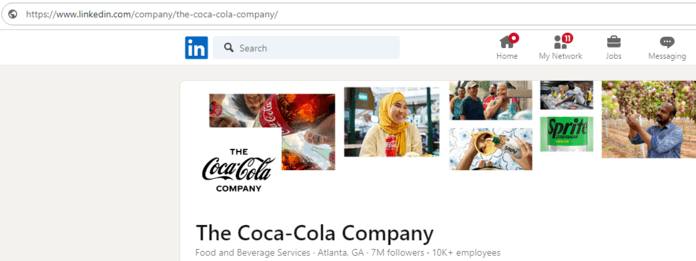
In most cases, businesses and professionals will use their name as their URL slug.
2. Complete your profile
Next, complete your LinkedIn profile, including the following fields:
- Profile picture
- Name
- Headline
- Location
- Industry
- Experience
- Education
- Miscellaneous fields, like skills, certifications, awards, and more
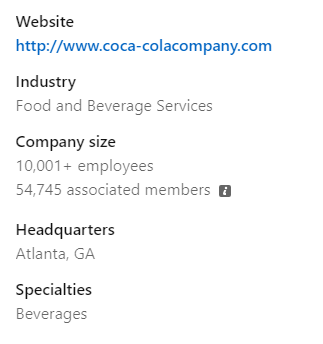
If you’re doing LinkedIn SEO for a business profile, you will not see all the above fields. Either way, we recommend completing your profile entirely so you provide LinkedIn and search engines with as much information as possible.
3. Create a captivating headline
Next, return to your headline and revise it.
LinkedIn headlines are one of the first things people see on LinkedIn, so don’t settle for generic text. Most people, for instance, use their job title as their headline on LinkedIn, which prevents their profiles from standing out (unless they’re well-known, like Richard Branson).
For this step, we recommend approaching writing headlines as like writing title tags.
You’ll want to include your target keywords, like “SEO company” or “seo consultant,” plus surrounding text that engages users, creates curiosity, and demonstrates authority. If you’re struggling to find ideas, try ChatGPT to brainstorm some options!
P.S. LinkedIn headlines have a 220-character limit.
4. Optimize your profile’s about section
Besides improving your headline, you’ll want to improve your about section for LinkedIn profile SEO.
Writing a LinkedIn about section is similar to writing SEO content for your site. You’ll include your target keywords while telling an engaging story demonstrating how you help your clients and deliver a stand-out solution.
You’ll have 2600 characters (370 – 650 words) to tell your story.
For the best results with your search engine optimization for LinkedIn here, we recommend using:
- Short paragraphs (no more than three lines)
- Lists
- Summaries

Formatting your about section for skimming gives your message a higher chance of being heard.
5. Upload original visuals
Your LinkedIn profile includes two spaces for visuals:
- Your profile picture
- Your banner picture
Use your logo (if optimizing a business LinkedIn profile) or your image (if optimizing a personal LinkedIn profile) for your profile picture. Upload a high-quality image so your brand looks professional and trustworthy.

For your banner picture, get a professional graphic (check Canva for templates) that demonstrates:
- Your focus
- Your impact
- Your brand
Richard Branson, for example, displays his latest initiative and the brands that endorse it, while businesses like OpenAI display their work via AI-generated artwork. If you’re struggling to create yours, you can hire a graphic designer, but this is not required with free tools like Canva.
6. Write SEO-friendly LinkedIn posts
Finally, post regularly on LinkedIn through posts, which you can optimize for SEO via keywords.
Compared to SEO content, LinkedIn posts are different. They tend to focus on current issues vs. best practices. You’ll often see posts highlighting stories from the workplace, whether it’s an internal conversation or a client success story.
Before creating your posts, ensure the information is safe to share.
While you don’t have to publish regularly, we recommend maintaining a monthly cadence (minimum) to build your audience. You should also set aside time to review and respond to comments, which are critical to building a community and online reputation.
For example, if you volunteer at a nonprofit, consider journaling about your work there.
7. Maintain your LinkedIn profile
Besides the above steps, commit to maintaining your LinkedIn profile SEO by updating your:
- Headline
- About me
- Pictures
These updates will keep your profile fresh and represent your latest accomplishments and focuses.
What is LinkedIn SEO?
LinkedIn SEO is the optimization of a LinkedIn profile to improve its visibility on Google and LinkedIn. Common tactics for LinkedIn SEO include keyword research, creating content, and ongoing maintenance. Profile owners, the best SEO companies, and SEO freelancers can all assist with LinkedIn SEO.
Why is LinkedIn SEO important?
LinkedIn search engine optimization is important for a few reasons, including the following:
Improve reach
When you optimize your LinkedIn profile for SEO, you improve your visibility on Google and LinkedIn. With greater visibility, you can increase your chances of reaching your target market and beginning a relationship with them.
Grow traffic
Greater online visibility also helps grow your profile or website’s traffic. With more qualified traffic on your LinkedIn profile or website, you can nurture potential leads and convert them into raving fans who purchase, share, and recommend your products or services.
Build authority
When you boost your LinkedIn profile SEO, as part of your social media SEO strategy, you also build your online authority. People can search your name online and learn your professional history, certifications, authorships, and more, which can establish your authority and trust in online spaces.
Improve your LinkedIn profile SEO with SEO.com
Congrats! You’re on your way to becoming an expert in search engine optimization for LinkedIn. If you want to leverage LinkedIn sooner rather than later, contact us to learn how our award-winning team of SEO experts can help!

Social Media Strategies Beyond Likes and Reach
Don’t fall victim to bland social posts that don’t drive results. Connect with our social experts today!


Social Media Strategies Beyond Likes and Reach
Don’t fall victim to bland social posts that don’t drive results. Connect with our social experts today!
Table of Contents
- 1. Customize Your Profile's URL
- 2. Complete Your Profile
- 3. Create a Captivating Headline
- 4. Optimize Your Profile's About Section
- 5. Upload Original Visuals
- 6. Write SEO-friendly LinkedIn Posts
- 7. Maintain Your LinkedIn Profile
- What is LinkedIn SEO?
- Why is LinkedIn SEO Important?
- Improve Your LinkedIn Profile's SEO with SEO.com

Social Media Strategies Beyond Likes and Reach
Don’t fall victim to bland social posts that don’t drive results. Connect with our social experts today!
Writers