


ChatGPT advertising enables you to showcase your products or services at the bottom of ChatGPT conversations. People who are on Free and Go plans will see the ads if they’re in the U.S., Canada, Australia, or New Zealand. The cost of ChatGPT ads ranges from a $3–5 per click or $25–$45 per 1,000 impressions.
ChatGPT ads are officially live! Big brands like Best Buy, Target, and Lowes are already taking advantage of these ads to gain extra visibility in front of audiences. And over 50% of ChatGPT replies are seeing ads.
Let’s talk about what these ads look like and how you can start leveraging them.
We’ll break it down for you here:
What do ChatGPT ads look like?
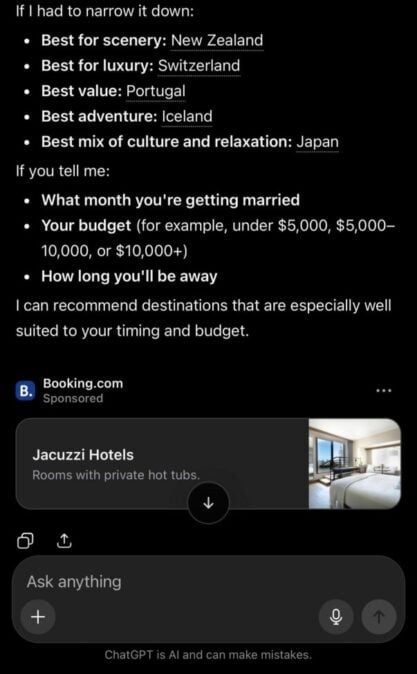
ChatGPT ads appear as a sponsored card at the bottom of a user’s query. The ad includes components like:
- Advertiser name
- Logo
- Title for ad
- Ad copy
- Image asset

Then when you click on the ad, it directs you to the landing page on the company’s website.

Some notable things about these ads is that they:
- Are always clearly labeled with a sponsored tag, so users know they’re advertisements
- Remain separate and distinct from ChatGPT’s organic responses
- Provide choice and control over data usage for users
July 2026 Update: ChatGPT has been spotted running two ads at the bottom of search results. While this may just be a test, it could indicate that ChatGPT will be expanding into offering two ads, from two different advertisers, to searchers.
Who will see ChatGPT ads?
People who are on Free and Go plans will see ads if they are located in the United States, Canada, Australia, or New Zealand. It’s expanding to UK, Japan, Brazil, Mexico, and South Korea. You will not see ads if you’re on a Plus, Pro, or Business plan. Ads will also not be shown to any users that identifies as being under 18 or ChatGPT predicts is under 18.
How much will ChatGPT ads cost?
ChatGPT offers two available models — cost per thousand impressions (CPM) and cost-per-click (CPC). The cost of running ads is typically $3–5 per click or $25–$45 per 1,000 impressions.
If you want to use the impression-based model, you’ll opt for the Reach objective.
If you want to opt for the click-based model, you’ll opt for the Clicks objective.
How does ChatGPT determine what ads to show?
ChatGPT’s ad system selects ads based on the relevance, context, and intent of a user’s query. It then looks at the context hints, ad title and copy, and landing page of your ad to determine if your ad is a good fit.

Context hints are hints you provide for ChatGPT to help it understand what conversations, topics, or keywords are most relevant for delivering your ads. They aren’t an exact-match situation, but rather, help inform the ad platform of the context of your ad so it can deliver it to the right searchers.
How do you launch ChatGPT ads?
Updated: July 2026
You can launch ChatGPT ads by using Open AI’s self-serve Ads Manager.
Follow these instructions to get your ads set up:
- Go to the OpenAI Ads Manager and log in with your business ChatGPT account
- Provide your legal business name, address, and tax ID
- Set up your billing information (credit card and billing details)
Once you do that, you can start creating your campaign. Here’s how you’ll do that:
- Choose your objective (clicks, conversions, or product feed)
- Set your context hints (targeting) to determine what topics or situations your ad should appear
- Determine your minimum daily budget
- Build your ad — headline, body copy, logo, and landing page
- Launch your ad
Once you launch your ad, it will be reviewed. It can take a few days for reviewed ads to be approved to officially go live.
Who should advertise on ChatGPT?
Companies whose target audience overlaps with ChatGPT’s should consider advertising there. The platform’s biggest audience (54-57%) is users between the ages of 18-34, which aligns with our findings on how different generations search.
That doesn’t mean companies targeting an older audience should skip ChatGPT ads.
There is a real advantage to being an early adopter of new — and fast-growing — marketing and advertising channels. With less competition in the space, early adopters can get more exposure (along with a lower acquisition cost).
Plus, with less competition, advertisers could see lower advertising costs than on more saturated networks, like Google Ads or Meta Advertising. Not to mention, businesses have the chance to dominate paid advertising opportunities while other companies hold off on advertising.
Who can’t advertise on ChatGPT?
ChatGPT has some restrictions around ads that can run:
- Ads on sensitive topics, like mental health, personal health, self-harm, or emotional reliance are not allowed.
- Anything that promotes sexual content, dangerous activities, political debates, or illegal goods are not allowed.
- Ads in categories like dating, tobacco and alcohol, gambling, or weapons are not allowed.
- Ads in the category of finance, legal, or healthcare require strict case-by-case manual review and approval.
Is ChatGPT advertising worth it?
ChatGPT advertising is worth it if you’re looking to increase brand exposure and recognition within ChatGPT. While it’s too early to say if clicks will be big and drive qualified leads, it is possible that these ads can create another avenue for businesses to capture leads primarily relying on ChatGPT for search queries.
How are ChatGPT ads different from traditional ads?
The model that ChatGPT ads operate on looks different than traditional ads. Here are some areas where they differ:
- Placement: Traditional ads typically appear at the top of search results. ChatGPT ads are built to only appear at the bottom after all the chat information.
- Targeting: ChatGPT ads focus on contextual targeting, rather than behavioral targeting. The platform delivers ads that seem relevant based on the information delivered. Traditional ads typically use behavioral targeting to serve ads after someone commits a specific action.
- Expectations: Because ChatGPT is AI, people have high expectations that ads will not be biased or interfere/influence the information they receive. Our strategists weigh in on that concern in our Q&A on the future of ChatGPT ads. Traditional ads are more established, and a little more trusted, so the expectations are lower.
Frequently Asked Questions about ChatGPT Advertising
Are ChatGPT ads self-serve?
Yes.
If you want to launch ChatGPT ads, you can do it on your own. You can use the Ads Manager Beta to launch your ChatGPT ads. The Ads Manager Beta is your one-stop shop for creating, launching, and managing campaigns for your business.
How can I track my ChatGPT Ads performance?
You can track your ChatGPT ads performance through the Ads Manager Beta. This reporting includes data like:
- Impressions
- Clicks
- Spend
- Click-through rate
- Average CPC
- Average CPM
- Conversions
You can also opt to track ChatGPT ads performance through your analytics tool of choice by adding UTM parameters to landing page URLs.
Why should I run ChatGPT ads?
There are quite a few benefits of running ChatGPT ads:
- It’s new, so competition is low: A lot of businesses are still behind on the AI search game, let alone running ads on these platforms. ChatGPT Ads affords you an opportunity to get ahead and start reaching leads now before your competitors figure it out.
- More personalized advertising: Because ChatGPT Ads looks more at context of searches, your ads are more relevant, personalized, and useful to your audience.
- Reach people at important times: As people weigh their options and do research, your ads are appearing at the right place and right time.
What industries benefit most from using ChatGPT advertising?
At this point, any industry can benefit from running ChatGPT ads. Since it’s such a new avenue and not a lot of businesses have adopted it, there’s a lot of benefit to running them.
One industry that’s really benefitting from running them is ecommerce. Many people go to ChatGPT to find products and get recommendations from the engine. If you’re selling products online, ChatGPT ads can be another great avenue for you to get brand exposure and leads.
On top of that, industries like tourism also benefit from running ChatGPT ads. Hotels, vacation spots, and other tourism businesses benefit from running ads, since many people using the platform to help build their trips.
If you want to figure out if your industry is a good option for running ChatGPT ads, try conducting some searches your audience might conduct to see if ads are appearing in them.
How do ChatGPT ads compare to Google Ads?
ChatGPT ads function a little differently than Google Ads.
One of the biggest differences between ChatGPT and Google is the targeting. Google’s targeting focuses on keywords and behavioral data. It considers things like what you’ve searched and sites you’ve visited.
With ChatGPT, the targeting is contextual. Ads are served based on the context of what people are searching and the information they’re hoping to find.
Another difference is placement. Google Ads typically appear at the top of search results, before organic rankings, though Google is now testing Direct Offers inside AI Mode. ChatGPT ads appear at the bottom, below all the served information.
Lastly, the cost model is different. For Google ads, the average CPM for a display ad is around $2–$5. ChatGPT’s is $25–$45. So the cost is different.
Get help with ChatGPT advertising
Want to run ChatGPT ads but don’t know where to start?
We offer ChatGPT advertising services to help you get ads running in ChatGPT and get your brand in front of people who conduct queries relevant to what you offer.
Connect with us today to learn how we can help you start appearing in ChatGPT responses!

Grow Your Visibility Beyond Google
Capture leads and traffic from emerging search platforms like ChatGPT, Perplexity, and Google AI.

Grow Your Visibility Beyond Google
Capture leads and traffic from emerging search platforms like ChatGPT, Perplexity, and Google AI.
Grow Your Visibility Beyond Google
Capture leads and traffic from emerging search platforms like ChatGPT, Perplexity, and Google AI.
Writers