



- What are SGE snapshots in AI Overviews? SGE snapshots are AI-powered answers that appear above organic search results in Google Search, providing topic overviews with suggested follow-up searches and citations to referenced content.
- What are the three types of SGE snapshots by traffic risk? Duplicate snapshots (low risk) mimic organic results, complementary snapshots (low-to-medium risk) summarize topics without fully satisfying intent, and accelerator snapshots (medium-to-high risk) meet user intent while providing highly accurate jumping-off points.
- How can you optimize for duplicate SGE snapshots? Focus on local SEO practices, optimize Google Business Profiles with accurate NAP information and photos, use LocalBusiness schema markup, and organically grow online reviews without incentivizing them.
- What strategies work for complementary SGE snapshots? Build interactive tools like cost calculators, create custom graphics for visual search intent, film video walkthroughs and upload them to YouTube, and continue practicing SEO best practices to rank higher in organic results.
- How do you appear in accelerator SGE snapshots? Join Google Merchant Center to provide product data, add Product schema markup to site listings for inventory details like price and ratings, get listed on third-party best-of compilation sites, and maintain strong SEO fundamentals.
What are SGE snapshots?
SGE snapshots are AI-powered answers to a user’s search. Exclusive to Google Search, AI Overviews appear above organic search results and include suggested follow-up searches and citations to the referenced content.
In Google’s AI Overviews (formerly Search Generative Experience or SGE), snapshots provide users with powerful topic overviews, from “who is ben franklin” to “dental floss picks” to “how to fix a leaking faucet.” However, SGE snapshots vary in appearance, traffic risk, and optimization tactics.
Learn more about SGE snapshots now, including how to optimize for them!
- What Are SGE Snapshots?
- What Are the Types of Snapshots in AI Overviews?
- How to Appear in AI Overview Snapshots
What are SGE snapshots?
SGE snapshots are AI-powered answers to a user’s search. Exclusive to Google Search, AI Overviews appear above organic search results and include suggested follow-up searches and citations to the referenced content.
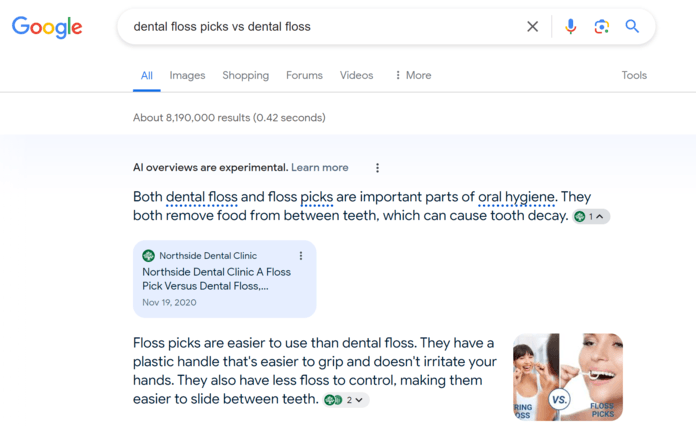
What are the types of snapshots in AI Overviews?
Google does not categorize the snapshots in AI Overviews into types, but SEOs do. Based on research into how these snapshots generate, SEOs have identified a few kinds of AI Overview snapshots.
At SEO.com, we like to use the classifications created by Aleyda Solis because they categorize snapshots by traffic risk, which is a key consideration for businesses. Below, we explore her categorizations:
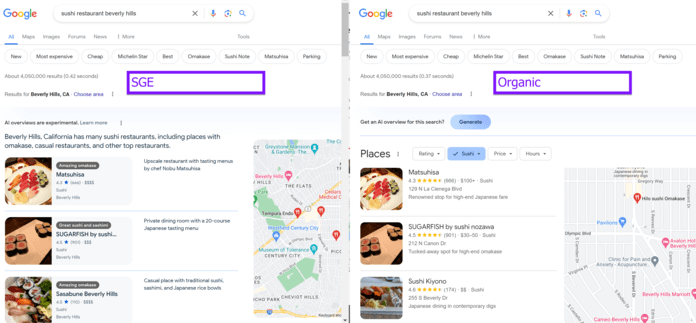
1. Duplicate
Definition: A duplicate SGE snapshot does not offer unique value because it mimics the organic search results too much. In the example below, the snapshot is almost identical to the organic search results.
Traffic risk: Low
Example: A search for “sushi restaurants near me”
2. Complementary
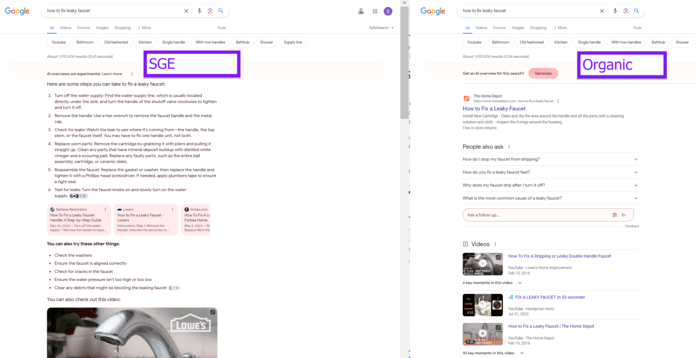
Definition: A complementary SGE snapshot offers value in summarizing a topic but doesn’t fully satisfy a user’s search intent. In the example below, the snapshot provides directions and a video, but the organic search results serve additional videos with key moments access.
Traffic risk: Low to medium
Example: A search for “how to fix a leaky faucet”
3. Accelerator
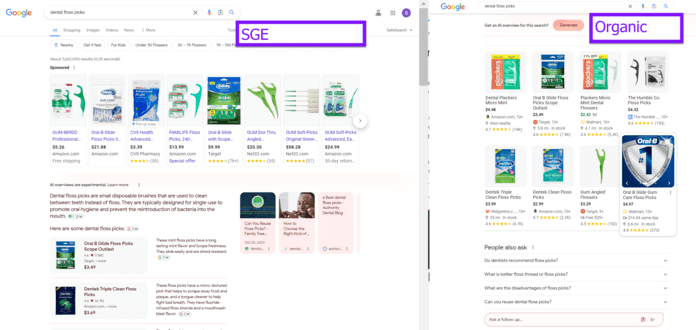
Definition: An accelerator snapshot meets a user’s search intent plus provides highly accurate jumping-off points. In the example below, users get a list of dental floss picks, shopping guides, and product highlights.
Traffic risk: Medium to high
Example: A search for “dental floss picks”
How to appear in AI Overview snapshots
Now, let’s explore how to appear in these specific snapshots for AI Overviews — as an aside, keep in mind that AI Overviews are undergoing frequent adjustments, which could affect the recommended optimizations.
For duplicate SGE snapshots
Optimize for duplicate SGE snapshots with these tips:
- Practice search engine optimization: Well-optimized sites appear in AI Overviews more often, so continue to invest in SEO and improve its performance. For duplicate SGE snapshots, local SEO is even more critical.
- Optimize Google Business Profiles: Claim or create a Google Business Profile for your business and its locations. Optimize them according to best practices, like including your name, address, and phone number, along with photos of your location and work.
- Use LocalBusiness markup: Continue to send Google signals about your business and its locations by adding LocalBusiness markup to relevant pages. Google (and AI Overviews) uses schema to understand the web better.
- Grow online reviews: Let clients know where to review your business online (if they like) through print materials, word-of-mouth, and other communications. Do not incentivize reviews — instead, let shoppers know there is an avenue for sharing feedback.
For complementary SGE snapshots
Optimize for complementary SGE snapshots with these tips:
- Practice search engine optimization: Again, focus on SEO best practices. These best practices will increase your likelihood of ranking higher in organic search results, which correlates to appearing in SGE snapshots, including complementary ones.
- Build toolkits: Target the missing piece of complementary SGE snapshots with interactive tools, like a cost calculator. While tools require design and development time, they’re incredibly effective for SEO and AI Overviews.
- Create custom graphics: Invest in custom graphics to enhance existing content’s value. Focus on content that targets a visual search intent, like looking for a walkthrough on how to fix something.
- Film walkthroughs: Use video walkthroughs (like how to fix a leaky faucet) to meet a user’s search intent, plus increase the chance of AI Overviews citing your video. For the best results, upload the videos to YouTube and optimize them for search.
For accelerator SGE snapshots
Optimize for accelerator SGE snapshots with these tips:
- Practice search engine optimization: SEO is critical to appearing in accelerator SGE snapshots and ranking well in organic search results for these key terms. Focus on SEO best practices, like producing helpful content to improve your rankings.
- Join Google Merchant Center: AI Overviews use Google Merchant Center, plus Google Shopping Graph, to help power its AI-powered snapshots. Join Google Merchant Center (if applicable) to provide more valuable data to SGE.
- Add Product markup to site listings: Google powers its Shopping Graph with data from multiple sources, including its search index. With Product markup, it’s possible to provide Google with more definitive data about product inventory, like price and ratings, making it critical for ecommerce sites.
- Get listed on third-party sites: Accelerator SGE snapshots often cite content that compiles the best-of-the-best products or services. Get listed on these sites to increase your chances of inadvertently appearing in SGE snapshots.
Check if your site appears in AI Overviews
Are you unsure if your website is appearing in AI Overviews? Our free AI Overview Checker will let you know! Not only that, it will display some crucial information for how organic results are informing the AI Overviews, and how your site can improve.

Rank in AI Overviews with SEO experts
Get started with the above tips to begin ranking in AI Overviews. For professional help with Search Generative Experience, consider our AI Overview optimization services, which partner your business with our award-winning team!

Track Rankings Beyond Search
Your prospective customers are searching in AI engines beyond traditional search. Are you ranking?

Future-Proof Your SEO Strategy with OmniSEO®
Goodbye search engine optimization, hello search everywhere optimization.
Future-Proof Your SEO Strategy with OmniSEO®
Goodbye search engine optimization, hello search everywhere optimization.
Writers